外观
icestark
icestark是一套微前端解决方案,不同于其他主应用和子应用界限分明的设计思路,更加偏向提供一种保持统一的交互体验感。主要借鉴了single-spa的设计思路,采用监听url变化来进行路由分发管理,以此基础实现微应用调度、生命周期管理、应用加载、样式隔离和沙箱等功能。出自于阿里,内部使用广泛。
设计理念
技术栈无关。icestark支持将一些独立的系统或者应用,集中在一个系统中。但是在集成过程中,会去做一些技术上的统一,即使当下不迁移,长远来看是逐步收敛技术体系的。因为阿里集团的内部在技术架构要求使用React,如果有一些存量的非React系统,会把它集成进来,但是在后续增量需求开发的时候,肯定会慢慢被React技术体系迭代升级掉。
开发体验一致。迁移过程中,不会引入新的概念和流程,保持跟原先的开发逻辑一致
路由能力。在 icestark 当中,路由其实是一个中心化的管理,所有的路由信息都是在框架应用中维护,根据路由的变化去做路由的分发和管理。
独立开发部署。其实在一定程度上会反映出上面提到的开发体验一致问题。之前的应用是独立开发、独立部署的,现在依旧保持原样,和微前端架构接入之前没有变化。
应用加载模式
主要有三种加载方式:1、AppRoute,适用于React为主应用的场景;2、应用注册方案,提供一套生命周期,适用于大部分前端框架;3、微模块方案,提供一种更细粒度的微应用加载方案,适用于模块级别的管理。
生命周期
在通过路由完成AppRoute注册或者registerMicroApps函数注册之后,调用start进入生命周期
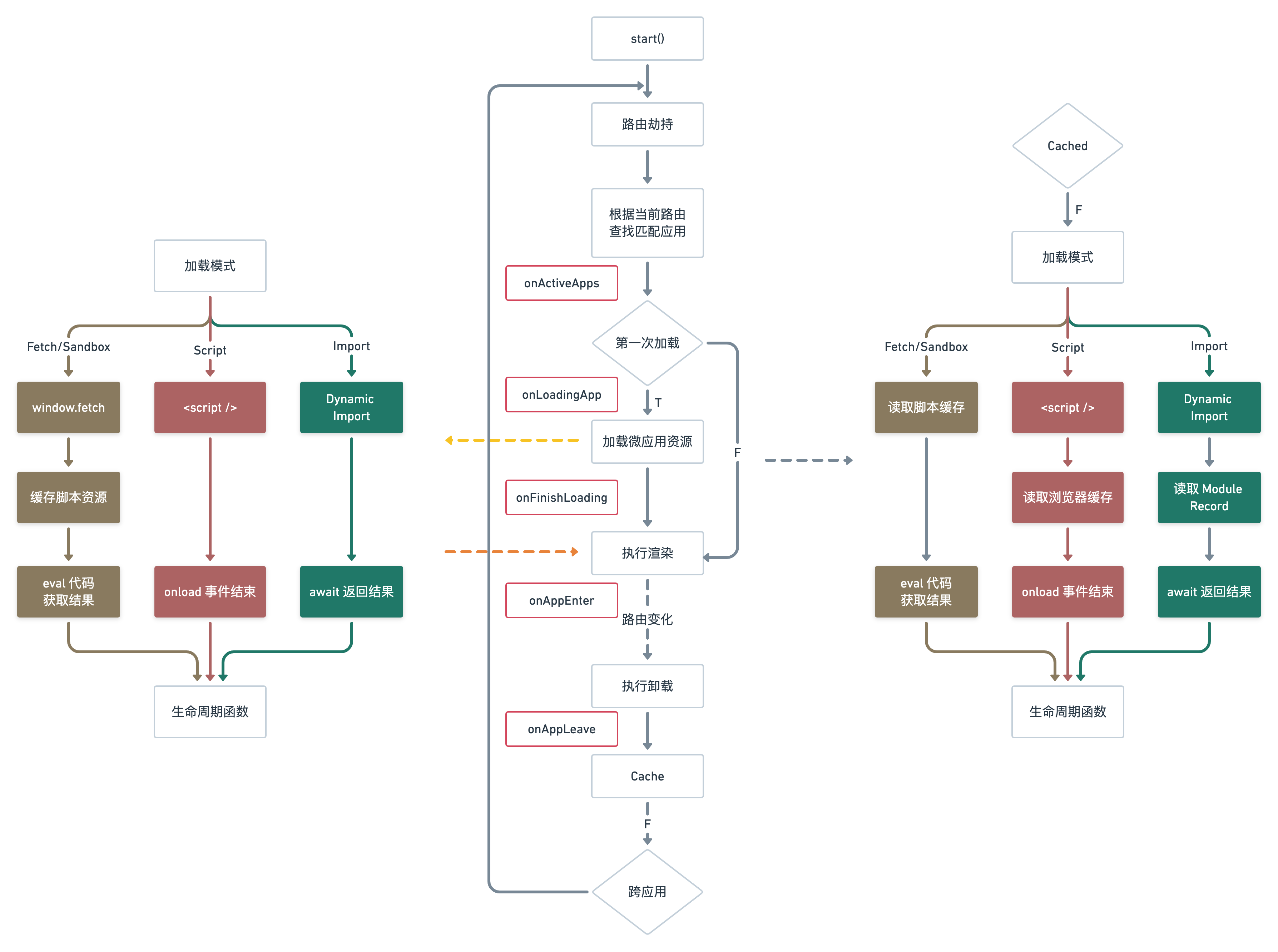
js
function start(options?: StartConfiguration) {
  // 1、样式缓存的配置保存到全局
  if (options?.shouldAssetsRemove && !temporaryState.shouldAssetsRemoveConfigured) {
    temporaryState.shouldAssetsRemoveConfigured = true;
  }

  // 2、避免重复调用
  if (started) {
    console.log('icestark has been already started');
    return;
  }
  started = true;

  // 3、标记主应用资源
  recordAssets();

  // 4、更新全局配置项
  globalConfiguration.reroute = reroute;
  Object.keys(options || {}).forEach((configKey) => {
    globalConfiguration[configKey] = options[configKey];
  });

  // 5、预加载子应用
  const { prefetch, fetch } = globalConfiguration;
  if (prefetch) {
    doPrefetch(getMicroApps(), prefetch, fetch);
  }

  // 6、路由劫持
  hijackHistory();
  hijackEventListener();

  // 7、初始化子应用
  globalConfiguration.reroute(location.href, 'init');
}
数据通信
在 @ice/stark-data npm 包中提供了应用通信的能力,核心其实是一个 EventBus 的机制,框架应用跟微应用之间的通讯,以 window 这样一个全局变量作为桥梁。这样不管是微应用添加的事件或数据,还是框架应用添加的事件或数据都可以访问到。
JS隔离方案
对于js的隔离,官方采用的是Proxy代理实现js沙箱。其源码位于代码库中package/sandbox文件夹下面。
js
/**
 * 创建Proxy沙箱
 * @param injection
 */
createProxySandbox(injection?: object) {
  const { propertyAdded, originalValues, multiMode } = this;
  const proxyWindow = Object.create(null) as Window; // 创建一个干净且高度可定制的对象
  const originalWindow = window; // 缓存原始window对象
  const originalAddEventListener = window.addEventListener; // 缓存原始addEventListener事件绑定函数
  const originalRemoveEventListener = window.removeEventListener;// 缓存原始removeEventListener事件移除函数
  const originalSetInterval = window.setInterval; // 缓存原始定时器setInterval函数
  const originalSetTimeout = window.setTimeout; // 缓存原始定时器setTimeout函数

  // 劫持 addEventListener,将绑定的事件名以及事件的回调函数全部储存在this.eventListeners中
  proxyWindow.addEventListener = (eventName, fn, ...rest) => {
    this.eventListeners[eventName] = (this.eventListeners[eventName] || []);
    this.eventListeners[eventName].push(fn);

    return originalAddEventListener.apply(originalWindow, [eventName, fn, ...rest]);
  };
  // 劫持 removeEventListener, 将解绑的事件名以及事件的回调函数从this.eventListeners中移除掉
  proxyWindow.removeEventListener = (eventName, fn, ...rest) => {
    const listeners = this.eventListeners[eventName] || [];
    if (listeners.includes(fn)) {
      listeners.splice(listeners.indexOf(fn), 1);
    }
    return originalRemoveEventListener.apply(originalWindow, [eventName, fn, ...rest]);
  };
  // 劫持 setTimeout,将每一个定时器的id储存在this.timeoutIds
  proxyWindow.setTimeout = (...args) => {
    const timerId = originalSetTimeout(...args);
    this.timeoutIds.push(timerId); // 存储timerId
    return timerId;
  };
  // 劫持 setInterval,将每一个定时器的id储存在this.intervalIds
  proxyWindow.setInterval = (...args) => {
    const intervalId = originalSetInterval(...args);
    this.intervalIds.push(intervalId); // 存储intervalId
    return intervalId;
  };

  // 创建Proxy,代理proxyWindow
  const sandbox = new Proxy(proxyWindow, {
    /**
     * 设置属性以及属性值
     * @param target 代理的对象 proxyWindow
     * @param p 属性名
     * @param value 属性值
     */
    set(target: Window, p: PropertyKey, value: any): boolean {
      // eslint-disable-next-line no-prototype-builtins
      if (!originalWindow.hasOwnProperty(p)) { // 说明原始window对象身上没有该属性
        // record value added in sandbox
        propertyAdded[p] = value; // 将该属性以及属性值记录在propertyAdded变量中
      // eslint-disable-next-line no-prototype-builtins
      } else if (!originalValues.hasOwnProperty(p)) { // 说明原始window对象身上有该属性, 需要在originalValues中记录下本次设置的属性以及属性值
        // if it is already been setted in original window, record it's original value
        originalValues[p] = originalWindow[p];
      }
      // set new value to original window in case of jsonp, js bundle which will be execute outof sandbox
      if (!multiMode) {
        originalWindow[p] = value; // 将window对象身上没有的属性设置到window对象身上
      }
      // eslint-disable-next-line no-param-reassign
      target[p] = value; // 设置属性以及属性值到代理的对象身上
      return true;
    },
    /**
     * 获取代理对象身上的属性值
     * @param target 代理的对象 proxyWindow
     * @param p 属性名
     */
    get(target: Window, p: PropertyKey): any {
      // Symbol.unscopables 介绍 https://developer.mozilla.org/zh-CN/docs/Web/JavaScript/Reference/Global_Objects/Symbol/unscopables
      if (p === Symbol.unscopables) {
        return undefined;
      }
      if (['top', 'window', 'self', 'globalThis'].includes(p as string)) {
        return sandbox;
      }
      // proxy hasOwnProperty, in case of proxy.hasOwnProperty value represented as originalWindow.hasOwnProperty
      if (p === 'hasOwnProperty') {
        // eslint-disable-next-line no-prototype-builtins
        return (key: PropertyKey) => !!target[key] || originalWindow.hasOwnProperty(key);
      }

      const targetValue = target[p];
      /**
       * Falsy value like 0/ ''/ false should be trapped by proxy window.
       */
      if (targetValue !== undefined) {
        // case of addEventListener, removeEventListener, setTimeout, setInterval setted in sandbox
        return targetValue;
      }

      // search from injection
      const injectionValue = injection && injection[p];
      if (injectionValue) {
        return injectionValue;
      }

      const value = originalWindow[p];

      /**
      * use `eval` indirectly if you bind it. And if eval code is not being evaluated by a direct call,
      * then initialise the execution context as if it was a global execution context.
      * https://developer.mozilla.org/en-US/docs/Web/JavaScript/Reference/Global_Objects/eval
      * https://262.ecma-international.org/5.1/#sec-10.4.2
      */
      if (p === 'eval') {
        return value;
      }

      if (isWindowFunction(value)) { // 判断是不是window对象身上的函数
        // When run into some window's functions, such as `console.table`,
        // an illegal invocation exception is thrown.
        const boundValue = value.bind(originalWindow); // 更改this指向为原始window对象

        // Axios, Moment, and other callable functions may have additional properties.
        // Simply copy them into boundValue.
        for (const key in value) {
          boundValue[key] = value[key];
        }

        return boundValue;
      } else {
        // case of window.clientWidth、new window.Object()
        return value;
      }
    },
    /**
     * 用于判断代理对象身上是否有指定的属性
     * @param target 代理对象
     * @param p 属性的key
     */
    has(target: Window, p: PropertyKey): boolean {
      return p in target || p in originalWindow;
    },
  });
  this.sandbox = sandbox;
}
样式隔离
样式隔离上面,更多的还是基于一些约定的隔离,用低成本的隔离方式,让样式之间不会相互影响。
样式隔离分成两块,一块通常是开发者自己业务代码中的样式隔离,业务代码的隔离推荐通过 CSSModule 的方式,能够自动生成 hash 后缀的样式名,基于每个不同的应用构建出来的样式,在天然上就能够做到隔离。
另外一块是基础组件样式隔离,大多数社区的一些基础组件,在设计上都考虑到样式前缀的替换。基础组件能够支持 CSS prefix 的方式,可以为所有样式添加一个前缀,在实践过程中将框架应用的前缀和微应用前缀进行区分,来完成样式的隔离。如果有不支持 CSS prefix 的样式,我们也能够借助社区 PostCSS 的能力给组件样式加上 namespace,框架应用跟微应用通过不同的 namespace 进行样式隔离。
微模块
业务场景
第一个场景就是多模块共存的场景,例如需要微前端的技术体系下面去实现一个多 tab 方案。在原有已加载的微应用基础上,新开一个 tab 页面,里面的内容又是独立的 bundle 资源渲染出来的。
第二个场景就是模块组合搭建。一个页面里面会有信息模块,表单模块,以及列表模块。在一些对外输出复用的场景中,如果直接接入整个页面,其通用性并不是特别强,但如果各个模块能够进行自由组合,就可以按需组合出不同需求的页面。
最后一个就是动态渲染模块。页面的内容由接口返回的数据决定。数据中会给出需要渲染的模块内容,比如无线的搭建场景,其实也是一个微模块的应用场景。
模块标准
微模块是以 UMD 的方式直接打包,通过这种标准模式打包,即便是以 npm 包的形式也可以正常使用。在微模块内部除了默认导出模块方法外,还需要定义挂载(mount)和卸载(unmount)的生命周期。
js模块
在生命周期内,使用Proxy代理window的方式来加载和卸载模块
css模块
在生命周期内,动态加载和卸载css标签,通过module属性来做区分